Iterate in 3D. Ship only the approved sample.
A physical sampling round means a shipment, a wait and feedback spread across emails and photos. ARkid turns each round into an upload: the product’s 3D twin in a private Sample Room for your brand customer, with every version and variant, notes pinned to the model by both teams, and 3D and AI renderings for their sell-in. Physical samples are kept for what has to be physical, and made of a version that is already approved.
- One private room per brand
- Every version kept
- EU-hosted (Germany)


Every sampling round costs a shipment.
Brands decide on what they can see and hold. Until now that meant a physical sample for every version and every colourway, shipped, reviewed in a meeting and answered by email. Each loop adds freight, cost and waiting, and the brand’s launch calendar does not move to make room for it.
One private room per brand, every version inside.
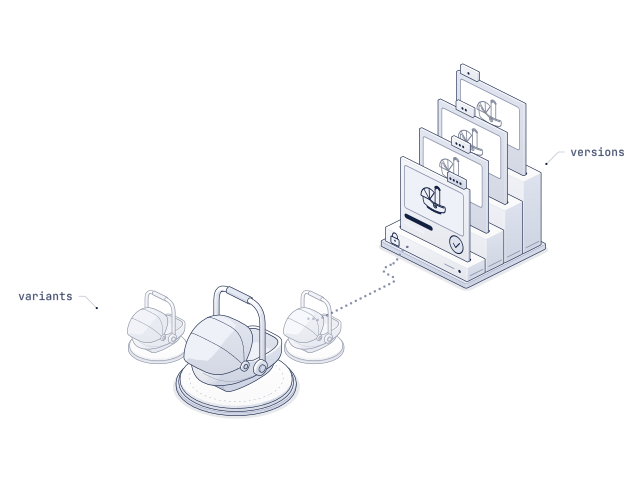
The Sample Room is a private space inside ARkid Catalogue that you open for one brand customer and one development. It holds the product’s 3D twin in every version and variant, the notes both teams leave on it and the renderings made from it.
Presented like a showroom. Locked like a vault.
A room opens by invitation. You decide who from the brand comes in: product management, design, quality and sourcing, and later their sales team. Each brand customer has its own rooms, so a plant that makes for competing brands keeps every development apart.
- Interactive 3D in the browser, no app or CAD licence required
- Every colourway, fabric, trim and configuration in the same room
- Every version kept, dated and compared side by side
- The look of the product, not your engineering files
A sampling round, without the freight.
The loop stays the one your teams know. Only the step in the middle changes: the twin travels instead of the sample.
- 01 · From CAD
Build the twin
ARkid Studio builds the product’s 3D twin from your engineering data, with every variant the brand asked for.
- 02 · By invitation
Open the room
You present the version to the brand’s team in a Sample Room: in interactive 3D, in AR at real size and in renderings.
- 03 · Both teams
Mark it up
The brand pins its notes to the part they are about. Your engineers answer in the same thread.
- 04 · v2, v3, …
Upload the next version
The new version opens beside the last. Open notes carry over until none is left.
- 05 · Physical once
Sign off, then sample
The brand approves the version in the room. The sample you send is the one they have already said yes to.
Feedback pinned to the part, not buried in an email.
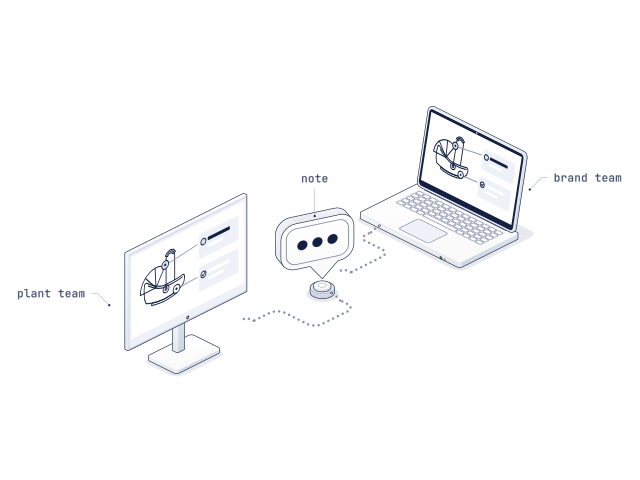
Most of a sampling round is spent explaining what a photo can’t show: which edge, which seam, which position. On the twin, the note sits on the part.
Both teams, one model.
The brand’s designer pins a note to the harness slot; your engineer answers in the same thread and closes it in the next version. Every note keeps its place on the model, its author, its status and its version.
For decisions that need a conversation, present the twin live in a call: everyone sees the same view while you turn it, open it and walk through the change.
- Notes on the exact part, in 3D
- Threads with an owner and a status
- Open notes carried into the next version
Renderings for the sell-in, before the sample ships.
The brand’s own teams have to sell the product internally and to their buyers long before it ships. The twin in the Sample Room gives them the pictures to do it.
Every variant, rendered from the twin.
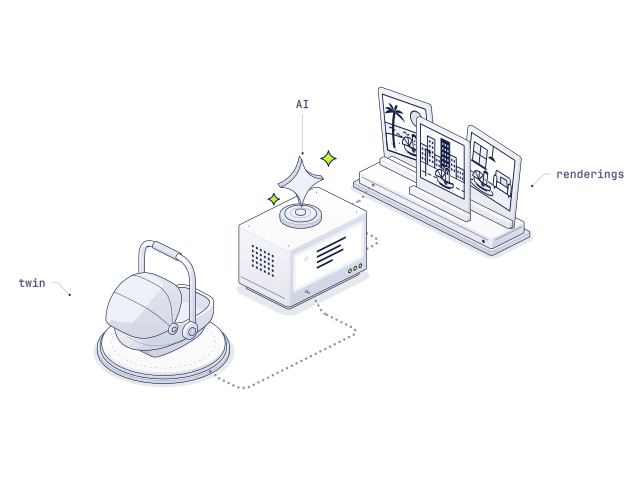
ARkid Studio renders the twin in 3D: pack shots, details and states, in every colourway. ARkid Creator, the AI virtual photo studio inside ARkid Catalogue, places the same twin in lifestyle scenes by prompt. The product stays accurate; only the scene is generated.
- Pack shots and 360° views of each version and variant
- Lifestyle scenes by region, from one twin
- New renderings with the next version, not a re-shoot
Digital where it can be. Physical where it must be.
Not every sample can go. A car seat still needs its crash tests and its golden sample. Everything before those can be decided on the twin.
Shell and tooling
Review shell geometry, fit and wall sections on the twin before the steel for the mould is cut. A change on screen costs far less than a change in the tool.
Covers and colourways
Fabrics, trims and colourways as variants of one twin. The brand shortlists on screen; you sew only the shortlist.
Mechanisms and assembly
Recline, rotation, harness routing and the base shown as states of the twin, so the brand understands the mechanism before the proto arrives.
Testing and homologation
Crash tests to R129 (i-Size) need the real seat. The twin makes sure the seat you send to the lab is the version both sides approved.
Golden sample
The reference for production, made once, against the version signed off in the Sample Room.
Launch and dispatch
The approved twin moves on to the brand’s launch: buyer meetings, product pages and AR, before the first container ships.
Built for the work between plant and brand.
What the Sample Room does between the plant and the brand, from the first version to the sample request.
- 01
One room per brand customer
Invitation-only rooms, one per brand and development. A plant that makes for competing brands keeps every project apart.
- 02
Versions side by side
Every upload is a dated version. Compare two side by side, or lay one over the other to see exactly what moved.
- 03
Variants on one twin
Colourways, fabrics, trims and configurations as variants of one twin, switched in the viewer instead of sewn.
- 04
Notes pinned to the part
Notes sit on the model where the issue is, in threads with an owner and a status. Open notes follow the twin into the next version.
- 05
Notes in both languages
Each note shows in the reader’s language beside the original, so the plant and the brand each write in their own.
- 06
Tech packs and test documents
Attach the tech pack, material specs and test reports to the version they belong to, so nobody reads last month’s file against this month’s model.
- 07
Sign-off with a name and a date
The brand approves a version in the room. Who approved what, and when, stays on record for both sides.
- 08
Watermarked, time-limited access
Every view carries the viewer’s name as a watermark, access ends on the date you set, and an access log shows who opened which version, and when.
- 09
Measure, section, check in AR
Dimensions and cross-sections on the twin, and AR at real size: in the car, on the floor, beside last season’s model.
- 10
Spec-sheet PDF export
Export a version as a PDF spec sheet: views of the twin, dimensions, variants and open notes, for the meeting or the file.
- 11
Sample requests from the room
Once a version is approved, the brand requests the physical sample of exactly that version, with its variant and notes attached.
The plant that answers fastest wins the next brief.
For the manufacturer
Shorter loops, fewer samples made and shipped, fewer late changes in the tool. And a stronger answer to every brief: the product in 3D, in every variant, while others are still packing their first sample.
For the brand
The whole range in view at once, feedback that stays on the part it is about, a clear record of what was approved, and sell-in material before the sample exists.
The approved sample is already a launch asset.
The twin that carried the sampling rounds is the twin the brand’s marketing needs next. It moves on to the brand’s ARkid Catalogue, its retailer network and ARkid Creator without being built a second time.
- For brandsLaunch from the twin, not the sampleWhat the brand does with the approved twin: retailers, product pages, AR and campaigns.
- CaseSEEC Nano 5: a launch pipeline in four weeksFrom engineering data to a launch-ready twin before the first sample.
- How it worksSeven stages, from concept to the shop floorWhere sampling sits in the full 3D pipeline.
Questions manufacturers ask first.
Do our brand customers see our CAD data?
No. The Sample Room shows a visual twin built for review: geometry, materials and variants as the brand needs to see them. Engineering files and tooling data stay with you.
Can two brands we make for see each other’s products?
No. Each room belongs to one brand customer and one development, and only the people you invite can open it.
Do we still need physical samples?
Yes, where they have to be physical: crash testing and homologation, and the golden sample for production. ARkid takes out the rounds before those, so the samples you do make are of a version that is already approved.
Who builds the 3D twins?
What does the brand need to install?
Nothing. The Sample Room opens in the browser on a laptop, tablet or phone, and AR works on the phone with no app required.
Where is the data hosted?
In the EU (Germany), on the same infrastructure as ARkid Catalogue.
What happens to the twin after sign-off?
The brand can take the approved twin on into ARkid Catalogue for its launch: buyer showcases, product pages, AR and Creator renderings, without building it again. See For brands.
Signed off once. Current everywhere.
Bring one product. We open the room.
Half an hour, screen-shared. We open a Sample Room with one of your products and walk through a sampling round with you, from the first version to sign-off.